You down with OPP (Yeah you know me)
You down with OPP (Yeah you know me)
Who's down with OPP? (Every last homie)
Large chunks of the “OPP” song (by Naughty by Nature, 1991) are pretty inappropriate for me to send out through work email. So, don’t think about those parts and we’re all good.
And don’t listen to it on your work computer or with students around. Just saying!
Instead of “OPP”, we’re going to talk about “OPV”
Like Naughty by Nature has said, “O is for Other, P is for People”
The last “V”, well, that’s not so simple.
I won't get into that, I'll do it...uh...sorta properly.
Ok, ok, enough silliness. This IS really a strategy and it IS really called OPV. O= Other; P= People; V=Views.
 Our benchmarks ask us to look at multiple perspectives frequently -- particularly with historically underrepresented groups. We even have a benchmark about seeing history through the eyes of the people who lived it.
We also have a current societal problem where people live in echo chambers where they don’t actually experience opposing viewpoints in their social circles -- or if they do, the common response is to ridicule and mock the other side.
So how can we help kids learn to examine Other People’s View? I’m down with OPV (I know i sound old. I can live with that)
 OPP, how can I explain it? I'll take you frame by frame it.
This is a hook activity that’s intended to be an introduction to a lesson and should take less than 10 minutes. Other People’s View (OPV) is from CoRT Thinking Tools , an exploration tool to broaden perception. It’s a very important part of thinking to be able to see the different points of view of other people -- not just your own. The OPV helps kids to broaden their (our?) overall thinking about a situation..
Here’s how to do it:
•Step 1: Display a photograph (or painting or another visual stimulus) without giving background information. Have students analyze the photograph.
•Step 2: In each of the thought bubbles have students individually write what they think the people/animals/objects in the image may be saying, thinking or representing. This step is intended to help students think about different points of view.
•Step 3: Have students share and compare the comments they wrote in the thought bubbles with a partner or in groups.
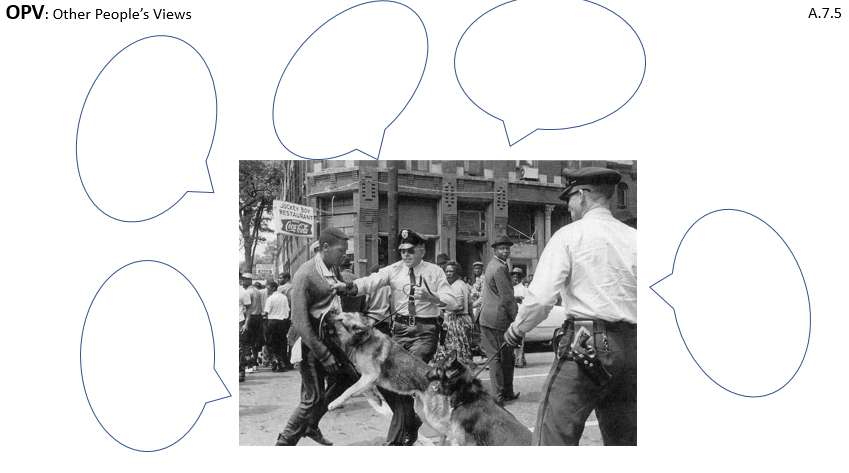 •Step 4: Debrief whole class making connections to related concepts and establishing historical context.
The example here shows a famous photo of police dogs and a Civil Rights demonstrator in Birmingham in 1963. How can students attempt to understand viewpoints of the the demonstrator, the bystanders, the police, --even the dog? \
How can we get use this tool to get students to look at multiple viewpoints?
 We can try this with photographs, of course. But political cartoons and paintings work, too. Here’s a Civil War cartoon about Lincoln. The caption (which may be too small here for you to read), says “Lincoln’s Last Warning: ‘Now, if you don’t come down, I’ll cut the Tree from under you’”.
This is an easy strategy to set up! Just open a word document, paste the image you want in the center (leaving big margins) and insert the speech-bubbles.
 If you don’t know where to find those, go into Word, under “insert” click “shapes”. At the bottom should be several versions of “callouts”. Choose one and resize and flip as needed.
That’s it.
Say OPV I like to say with pride
Now when you do it, do it well and make sure that it counts
You're not down with a discount
You’re down with OPV (Yeah, you know me!)
Don’t forget to have your kids share their thought bubbles together to encourage deeper conversation. It doesn’t have to take long and it encourages creative thinking and multiple viewpoints!
 Well if you do, that's OPP and you're now down with it
But if you’re not, here's your membership
You’re down with OPV.
Yeah? You know me?
Email me! Tell me how OPV goes!
-Tracy